



Generative AI is now routine for students, with 95% of UK undergraduates using it in some form, according to HEPI’s 2026 survey of 1,054 students. For students and writers who want that help in one place, QuillBot offers a suite of features, including a paraphraser, grammar checker, AI detector, plagiarism checker, and more.
We tested QuillBot’s writing assistant suite on our own drafts using the free plan. If you’re exploring QuillBot for writing and editing support, we’ve compiled our test results to show what the tool currently offers.
Table of Contents
What Is QuillBot?
QuillBot is an AI writing assistant that helps you improve text you’ve already written. It started in 2017 as a paraphrasing tool. It has since grown into a suite that also checks grammar, plagiarism, and AI-generated content, summarizes long documents, and creates citations.
Three University of Illinois students, Rohan Gupta, Anil Jason, and David Silin, founded the company to help English learners write more clearly. QuillBot kept that student focus as it grew. In August 2021, Course Hero bought QuillBot, later renamed Learneo, and also acquired the academic editing service Scribbr.
During those years, QuillBot kept adding tools around its paraphraser. Today, they cover most stages of writing a paper or an article. You can summarize your sources, rewrite passages in your own words, fix grammar mistakes, check the draft for plagiarism and AI content, and format your citations, all without switching apps.
All ten tools appeared in one sidebar on our free account. We used the Chrome extension and the MS Word add-in to run most of them in Google Docs and Word, but we intentionally used the web app. QuillBot says it’s trusted by more than 35 million writers, but that figure comes from the company itself.
What Are The Best Features of QuillBot?
QuillBot’s strongest features are its Paraphraser and grammar checker, both of which work well on the free plan. The AI detector is useful for a quick check, but like other AI content detectors, it isn’t reliable enough to treat as 100% accurate. Meanwhile, the plagiarism checker and most paraphrasing modes need a paid plan.
How We Tested QuillBot
We tested everything on free accounts on an HP EliteBook 745 G6 with Windows 11 Pro. We used three ways: the web app, the Chrome extension inside Google Docs, and the Word add-in.
We wanted to see whether QuillBot helps with real writing, so we used material we already had:
- For the Paraphraser: paragraphs from our own published articles.
- For the grammar checker: a rough draft where we planted spelling, punctuation, and agreement errors.
- For the AI detector: We used three samples. One was written entirely by ChatGPT, one was a human-written article from our archive, and one mixed AI paragraphs into human writing.
- For the plagiarism checker: A new article we wrote that has not been published and another article that we already have up.
Paraphraser
The Paraphraser rewrites your text in different words while keeping the meaning. On the free plan, it handles 100 words at a time in 10 different modes. We started with an 86-word paragraph from one of our recent articles on Suno vs Udio and ran it through Standard mode.
QuillBot swapped about a third of the words and reordered two sentences, but the meaning stayed intact. Each changed word is color-coded, and you can click one to see other choices. That helped when a swap didn’t fit. For example, QuillBot changed “rollout” to “introduction,” and we changed it back.
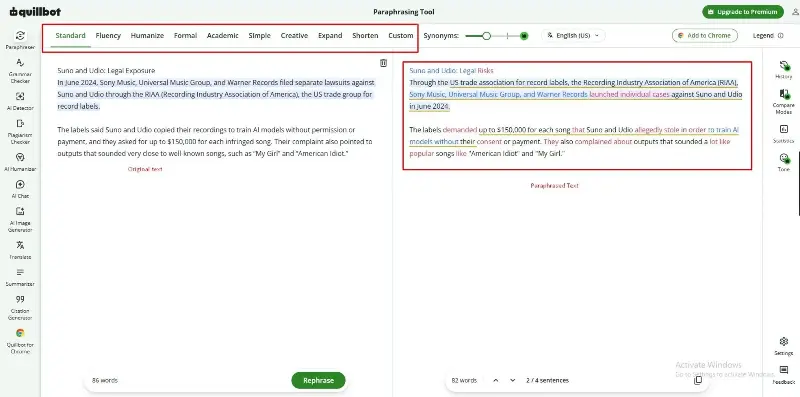
Fluency mode works differently. It focuses on making the text read smoothly rather than changing it from the original. The 100-word limit was the biggest problem on the free plan. To rewrite a longer section, we had to paste it in batches. QuillBot treated each batch separately, so the joins between paragraphs didn’t flow.
The modes that would have helped most, such as Formal, Academic, Simple, Expand, and Shorten, were locked behind the Premium plan. According to QuillBot, Premium removes the word cap and unlocks nine built-in modes, unlimited Custom modes, and paraphrasing in 23 languages.
Grammar and Plagiarism Checkers
QuillBot’s grammar checker is free and catches most basic grammar mistakes, but the deeper style and clarity suggestions need Premium. Meanwhile, the plagiarism checker is Premium-only. It scans up to 25,000 words a month and returns a similarity score with links to the matching sources.
Grammar Checker
For the grammar checker, we pasted a 1385-word draft of our review of QuillBot. They included miscapitalization, misspellings, missing commas, and subject-verb mismatches. On the free plan, QuillBot flagged 36 grammar corrections in a few seconds and underlined each one in the editor.
One consistent error flagged was our capitalization of “QuillBot.” We used “QuillBot,” but the grammar checker flagged it and suggested “Quillbot.” If you notice, we didn’t proceed with the change because, based on the branding consistency we’ve seen for the company, it’s usually either “QuillBot” or “quillbot.”
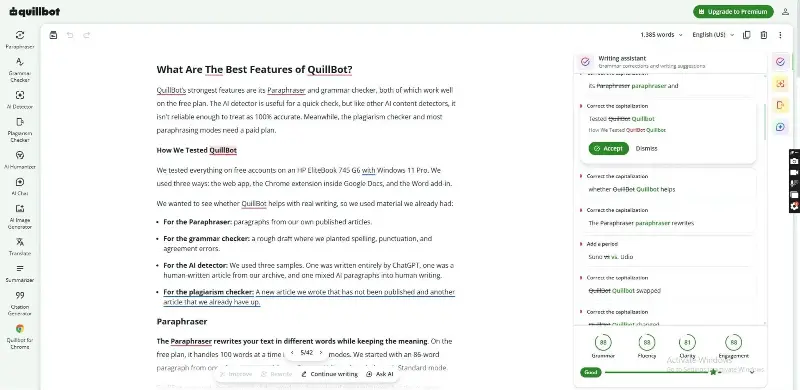
It also gave an overall grade for our text based on factors like grammar, fluency, clarity, and engagement. We accepted fixes by clicking on the suggestions, and the “Fix all” button cleared every flagged error at once.
Alongside the free fixes, the sidebar showed a count of Premium-only advanced suggestions, including advanced writing suggestions, tone insights, and grammar checking in six languages.
The Word add-in worked the same way as the web app. Corrections appeared in a side panel next to our document, so we didn’t need to paste the draft anywhere else. For everyday grammar checking on emails, assignments, or blog drafts, the free version is enough. Writers who need detailed style feedback on long manuscripts need the Premium plan.
Plagiarism Checker
We planned to compare two documents: an unpublished article we’d just finished and one that’s already live on our site. We didn’t get to run either scan. On the free plan, pasting the text and clicking Scan led straight to an upgrade prompt because QuillBot offers the plagiarism checker only to Premium users. Free accounts don’t get a limited trial scan either. The page simply tells you to upgrade.
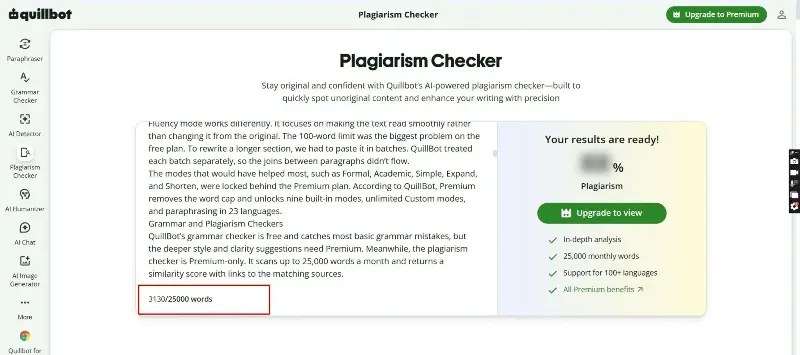
Based on QuillBot’s published details, here’s what Premium gets you:
- Word allowance: Up to 25,000 words a month, with more available as add-ons. You can buy 6,250 words for $2.45, 25,000 for $8.95, or 62,500 for $19.95.
- Languages and files: Scans in more than 100 languages. You can upload .txt, .pdf, .docx, and .html files.
- Reports: Each report shows a similarity score, a list of matching sources, and the passages that may need citations. You can download the report and create one-click citations in APA, MLA, or Chicago style.
- Privacy: QuillBot runs the scans through CopyLeaks, a third-party service. QuillBot says CopyLeaks doesn’t store your content.
There’s one important limit. QuillBot states that its plagiarism checker cannot detect paraphrased content. So if you reword a source too closely with the Paraphraser, this checker won’t flag it, even though your school or client may still treat it as plagiarism.
AI Detector
QuillBot’s AI detector estimates how much of a text was written by AI and highlights the sentences that look AI-generated. On the free plan, you can scan up to 1,200 words at a time, six times a day. In our test, it was accurate on fully AI-written and fully human-written text, and less sure on mixed drafts.
Test with 100% AI-generated Content
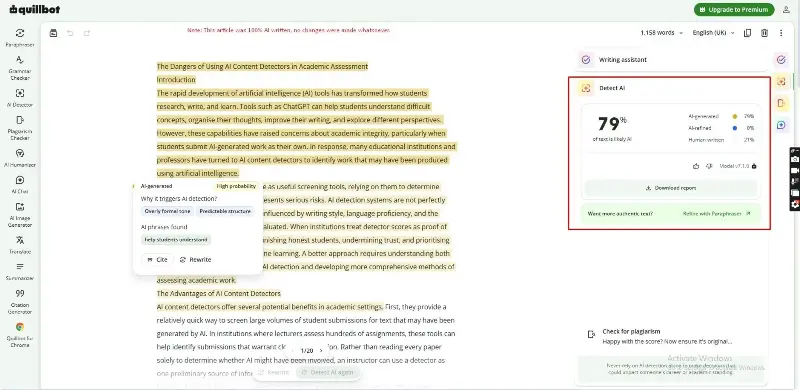
We started with the ChatGPT-written sample. QuillBot labeled it 79% AI-generated and 21% Human-written, and highlighted every sentence it labeled AI-generated. This is problematic because ChatGPT produced the entire document with zero changes.
However, this is not unique to QuillBot, and when you hover over the score, it also clearly states, “Our AI detector is among the most advanced available, but no AI detector is 100% accurate. This score represents the percentage of words likely generated or refined using an AI tool.”
Test with 100% Human-written Content (thesis from pre-AI wave 2020)
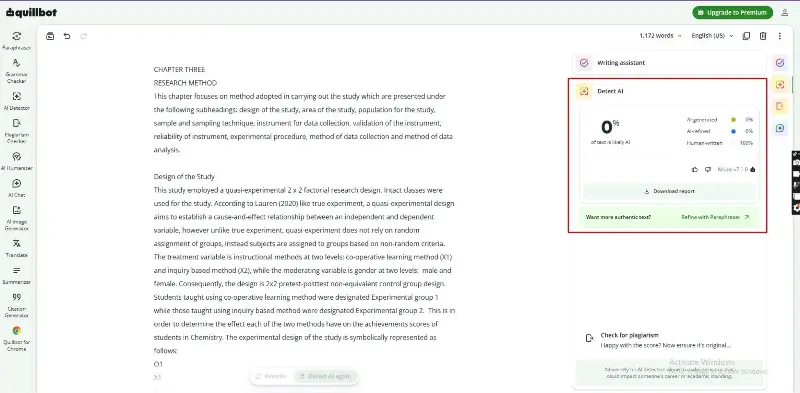
Next, we scanned the human-written article from our archive. We intentionally chose a thesis written in 2020, about 2 years before the AI wave. Our goal was to use a document we knew was human-written. We uploaded about 1,172 words from a part of the thesis, because QuillBot has a limit of about 1,200 words.
The result came back as 0% AI-generated and 100% human-written. This was impressive because we’ve seen cases where AI content detectors flagged historical books, making users wonder about their reliability. Because this thesis was written before the AI wave, we decided to run another test with a 100% human-written article that was created recently.
Test with 100% Human-written Content (written post-AI wave 2023)
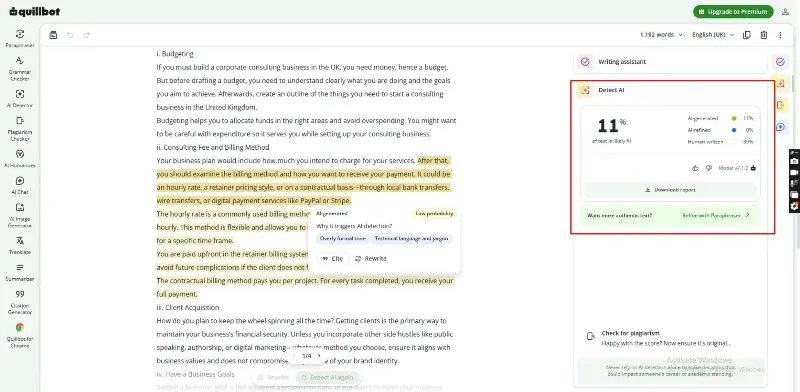
For the second human test, we used a guide on starting a consulting business in the UK, which our team wrote in 2023 without AI help. Because we wrote it after ChatGPT became widely used, it shows how QuillBot handles recent human writing, which most students and writers actually submit. We pasted 1,192 words, just under the 1,200-word free limit.
This time, QuillBot scored the article 11% AI-generated, 0% AI-refined, and 89% human-written. It highlighted four passages, mostly in the section explaining billing methods such as hourly rates, retainers, and contract payments. When we clicked a highlighted passage, QuillBot labeled it “Low probability” and listed two reasons: “Overly formal tone” and “Technical language and jargon.”
Test with Mixed Content (Human-written Thesis Refined with ChatGPT)
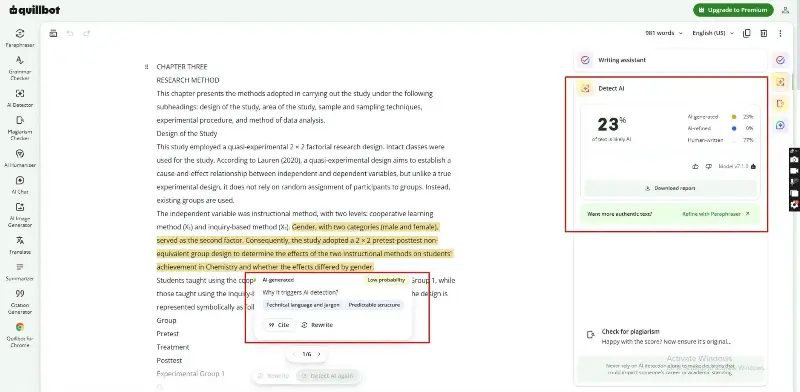
For the mixed sample, we returned to the 2020 thesis that QuillBot scored as 100% human-written and asked ChatGPT to edit it. We pasted the text with this prompt:
“Refine this part of my thesis. Check for inaccuracies and make any other changes you think would improve the document. Keep your changes to no more than 50% of the full text, and keep the result under 1,300 words.”
ChatGPT returned a 981-word version of the research methods chapter. When we scanned it, QuillBot scored the text 23% AI-generated, 0% AI-refined, and 77% human-written. It highlighted six passages, including the paragraph explaining the study’s 2 × 2 pretest-posttest design.
Each highlighted passage was marked “Low probability,” with “Technical language and jargon” and “Predictable structure” given as the reasons. QuillBot also left the “AI-refined” category empty, even though refining human writing was exactly what we’d asked ChatGPT to do. That category is meant to catch this kind of edit.
AI Chat, Humanizer, Summarizer, and Citation Tools
QuillBot’s other tools help with reading, drafting, and referencing.
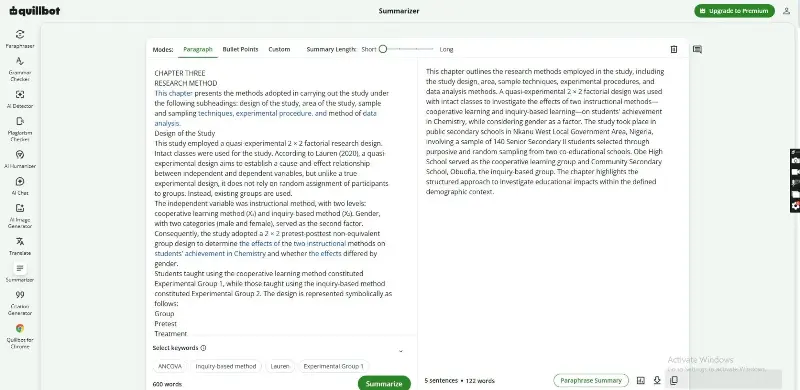
We used the Summarizer most outside of testing. We pasted the opening sections of the thesis we used for the AI detection test, and QuillBot condensed them into a short paragraph that kept the key points and figures.
You can choose a paragraph summary or bullet points, and a slider with four length settings lets you control how short the result is. QuillBot says the free version summarizes up to 600 words at a time with no daily cap. Premium raises the limit to 6,000 words and adds Custom summaries, where you tell the tool what to focus on.
The Citation Generator is the most generous tool in the suite. It’s free with no limits and supports more than 1,000 citation styles, including APA, MLA, Chicago, and Harvard. We pasted a journal article link and got a correctly formatted APA reference in a few seconds. The one thing we had to fix was a missing publication date, which we added by clicking the pencil icon. You can also upload a PDF to cite it, and export the whole list to Word.
The AI Humanizer rewrites AI-assisted drafts so they read less stiffly. It varies sentence length and removes repetitive phrasing. On the free plan, it handles up to 100 words with limited usage. The paragraph we tried came back smoother, though some of the rewording was more noticeable than we’d like.
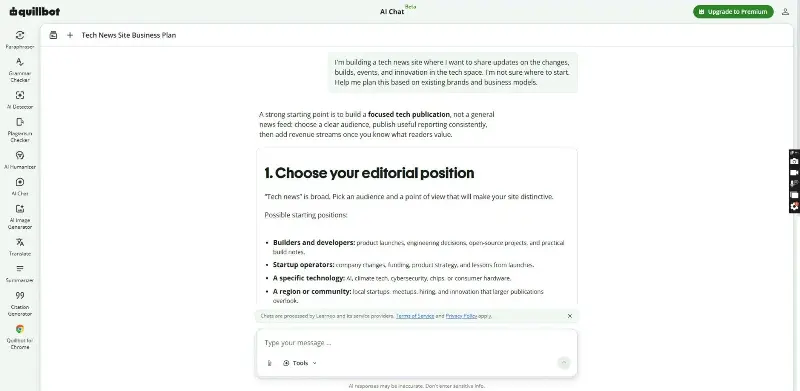
AI Chat and QuillBot Flow, the writing workspace that replaced Co-Writer, are where QuillBot comes closest to a general AI assistant. AI Chat can brainstorm, outline, and draft. For this, we used this conversation starter, and it gave us a six-step process on how to build a “focused tech publication”:
“I’m building a tech news site where I want to share updates on the changes, builds, events, and innovation in the tech space. I’m not sure where to start. Help me plan this based on existing brands and business models.”
QuillBot Flow puts a document editor next to QuillBot’s other tools, so you can write, paraphrase, and fix grammar in one place, with 10 MB of document storage on the free plan. Both worked fine for short drafts in our testing. However, if you need an assistant for research or long-form writing, a dedicated chatbot like those in our Claude AI review does more.
How Is The Pricing of QuillBot?
QuillBot has a free plan, a Premium plan for individuals, and a Team plan for groups. Please note that prices vary by region.
Free Plan
The free version is where we did all our hands-on testing. It’s useful for light, everyday work. You get:
- Paraphraser: two writing modes, Standard and Fluency, with a 100-word limit per paraphrase.
- Grammar checker: catches basic errors.
- AI detector: up to 1,200 words per scan, six scans a day.
- Summarizer: paragraph and bullet-point summaries.
- Citation Generator: free with no limits.
Premium Plan
Premium starts at $8.33 a month, billed annually at $99.95. Month-to-month billing costs $19.95/month, and there’s also a semi-annual option. Premium gives you:
- Unlimited paraphrasing in all modes
- Advanced grammar suggestions
- Unlimited AI detection
- The plagiarism checker, with 25,000 words a month
- 6,000-word summaries
- Full access to the Humanizer
If you need more plagiarism scans, you’ll pay extra for word packs. A premium account lets you use up to 10 devices at once, and you can pause your subscription instead of canceling. The price you see depends on your location. When we opened the upgrade page from Nigeria, our account was offered Premium at $4.17/month on annual billing, half the US rate.
Team Plan
The Team plan gives several people Premium under one purchase. It adds writer-management dashboards and centralized billing. Pricing goes down as you add seats:
- 2-10 seats: $7.50/per seat monthly ($89.95 per seat, billed yearly)
- 11–50 seats: $6.66 per seat per month
- 51+ seats: $5.83 per seat per month
For a small agency or school department, that’s cheaper than buying individual Premium plans. However, Team members get the same tools as Premium users and no shared workspace for editing together.
What Are The Pros and Cons of QuillBot?
Pros
- Generous free plan: The free plan covers grammar checking, AI detection, summaries, and unlimited citations at no cost.
- The AI detector correctly separated fully AI-written text from human writing and didn’t flag our human-written article.
- Integrations: The Chrome extension and Word add-in let users use the tool without opening the web app.
- Premium costs less than some competitors: QuillBot costs $8.33 a month on annual billing, compared with $12 for Grammarly Pro.
Cons
- The free word limits are tight. The 100-word Paraphraser limit can discourage users from doing much. It is only good enough if you simply need to paraphrase a few sentences.
- Rewriting content can change the tone you are aiming for.
- There’s no plagiarism checker on the free plan, and even the Premium plan can’t catch paraphrased plagiarism.
QuillBot Alternatives: Grammarly, ProWritingAid, Jasper and More
These are some of the top alternatives to QuillBot:
| Tool | Best for | Free plan | Starts at (annual billing) | Month-to-month |
|---|---|---|---|---|
| QuillBot | Paraphrasing, AI detection, students | Yes | $8.33/mo | $19.95/mo |
| Grammarly | Grammar, tone, workplace writing | Yes | $12/mo | Varies |
| ProWritingAid | Fiction and long-form style editing | Yes, 500 words per check | $10/mo | $30/mo |
| Jasper | Marketing content at scale | No, 7-day trial | $59/seat/month | $69/seat/month |
Prices are US list prices checked in October 2026 and may vary by region.
Grammarly is the better pick if you need better grammar quality than paraphrasing. Its Pro plan adds full-sentence rewrites, tone adjustments, plagiarism checks, and AI detection. It catches the kind of context errors that QuillBot missed in our test, but it costs more and has no dedicated paraphrasing modes.
ProWritingAid suits writers working on long manuscripts. Its reports assess pacing, repetition, and readability across entire chapters. That depth makes it a better fit than QuillBot for writing fiction, although the free plan only checks 500 words at a time.
Jasper solves a different problem. It’s an AI writing platform for marketing teams that generates on-brand campaigns, emails, and landing pages from scratch. If you want software that drafts and acts on its own, our guide to the best AI agents covers tools built for that kind of work.
Who Should Use QuillBot?
Here is what we think based on our experiments:
Who it’s good for
- Students get the most from the free plan. Citations, summaries, grammar fixes, and an AI detector to check their own work before submitting cover most assignments.
- Bloggers and content writers can use the Paraphraser and Summarizer to refresh old posts or turn research into a first draft.
- Marketers working through emails, product copy, and social posts will find the Chrome extension most useful. QuillBot works inside Gmail, Google Docs, and most web editors without copying and pasting.
- Academics and researchers benefit from the 6,000-word Premium summaries and the Citation Generator’s 1,000+ styles. For literature searches with cited sources, an AI search tool like the ones in our Perplexity AI review works well alongside QuillBot.
Who should look elsewhere
- Long-form fiction authors: QuillBot works paragraph by paragraph and has no chapter-level feedback on pacing or style. That’s where ProWritingAid does better.
- Teams that need a top-tier grammar checker: QuillBot missed context-dependent errors in our test, and the Team plan has no shared style guide. Grammarly is the safer pick for company-wide editing.
Final Verdict: Is QuillBot Worth It in 2026?
QuillBot is worth using for free, and worth paying for only if you paraphrase, summarize, or check plagiarism every week. In our testing, the free plan handled grammar checks, AI detection, citations, and short summaries well enough that occasional users don’t need to upgrade.
Premium earns its price through unlimited paraphrasing and the plagiarism checker. Even then, it’s an editing assistant, not a replacement for your own writing or for a full AI chatbot.
If you’re deciding now, use the free plan for a while on your work. Upgrade only when you reach the 100-word paraphrasing limit or if you need to run plagiarism checks. If you do upgrade, use the 3-day money-back window to run a plagiarism scan on your own documents and see how well it works before you commit to a full year.
Frequently Asked Questions
Which is better, QuillBot or Grammarly?
QuillBot is better for paraphrasing, summarizing, and AI detection at a lower price. Its Premium plan costs $8.33/month with annual billing, compared with $12 for Grammarly Pro. Meanwhile, Grammarly is better for grammar and tone, and it caught harder, context-dependent errors that QuillBot missed in our testing.
Is QuillBot a good grammar checker?
QuillBot is a good grammar checker for everyday writing. On its free plan, it caught 16 of the 20 errors we planted in a test draft. It missed context-dependent mistakes like comma splices, so you may prefer Grammarly or ProWritingAid for professional editing.
How accurate is QuillBot?
QuillBot’s AI detector correctly separated fully AI-written text from human writing. It was less reliable on mixed drafts. Its Paraphraser kept our meaning accurate but sometimes changed the tone.
Is QuillBot legit and safe to use?
Yes, QuillBot is a legitimate company owned by Learneo, which also runs Scribbr and LanguageTool. QuillBot stores scanned text so you can view past reports later, and it says its plagiarism partner, CopyLeaks, doesn’t keep your content. Always check your school’s AI policy before using it on assignments.
Is QuillBot expensive?
No, QuillBot is one of the cheaper writing assistants. The free plan covers most basic tools. Premium costs $8.33/month billed annually in the US, or $19.95 month-to-month; prices are lower in some regions. Team plans start at $7.50 per seat per month.
Is QuillBot AI detectable?
Yes, text rewritten with QuillBot can still be flagged by AI detectors. QuillBot’s own detector is built to recognize AI-refined writing. A peer-reviewed 2024 PMC study found that detection rates for paraphrased AI text ranged from 0% to 100%, depending on the detector.
Is QuillBot or ChatGPT better?
They do different jobs. ChatGPT is better for writing new content, answering questions, and research. QuillBot is better for editing text you already have, with dedicated paraphrasing modes, grammar checks, citations, and plagiarism scanning. Many writers draft in ChatGPT and polish in QuillBot.
Is paying for QuillBot worth it?
Paying for QuillBot is worth it if you paraphrase or summarize long documents every week, or need plagiarism checks. Occasional users can stay on the free plan. If you upgrade, annual billing at $8.33 a month costs less than half the month-to-month price.